How to start an online store: a step-by-step guide
A complete guide to starting an online store: pick what to sell, choose a platform, build the store, set up payments and shipping, write your policies, launch and get your first customers.
The morebasket team ·

To start an online store, decide what you will sell and to whom, choose a platform, build the store and add your products, connect payments, set up shipping, write your policies, test an order, and then launch and tell people. You can do all of it without a developer, and a small shop can be live within days.
This guide walks through every step in order, with a link to a deeper guide for each one. Read it once through, then use the steps as a checklist.
1. What should I sell, and who is it for?
Start with a short, plain statement: what you sell, and who buys it. “Handmade silver jewelry for people who like simple, everyday pieces” is a better start than “jewelry”. The more clearly you can say it, the easier every later step becomes, from naming the shop to writing product descriptions.
Check three things before you invest time:
- Is there demand? Search for what you plan to sell and see who else sells it, and how.
- Can you source or make it? Know where the products come from, and what happens when an item sells out.
- Can you ship it? Heavy, fragile or regulated products change your costs and your rules. If you sell something that needs a licence, an age check or special labelling, find out what the law requires where you sell, before you list it.
If you are not sure yet, start with a small range of products you can describe well. You can add more once the first ones sell.
2. Which platform should I choose?
Choose a platform by comparing how clear the cost is, how checkout works, how much effort the building takes, how deep the catalog tools go, where you can sell, what support you get, and how hard it is to leave later. Our guide to choosing an ecommerce platform has a seven-point checklist you can score in an evening.
Two questions help narrow the field early:
- Do you want a hosted platform or a self-hosted one? Hosted means the platform runs the technical side for you. Our guide to hosted versus self-hosted explains the trade-off.
- Are you moving from another platform? If you already have a store, see moving from Shopify to morebasket and Shopify alternatives.
3. What will it cost?
Plan for the platform, your domain name, payment fees, shipping, any paid apps, photos and content, and some marketing. Payment fees come from your payment provider, and shipping costs depend on what and where you ship. What an online store costs lists every category so you can build your own estimate.
Add up a realistic first year, not just the first month. It is easier to start small and spend more once you see what works.
4. What should I call my store?
Pick a name that is easy to say, easy to spell and not already taken, as a domain name and on the social channels you plan to use. Read how to name your online store for a simple process. Check that the name does not clash with another business before you commit to it.
5. How do I build the store?
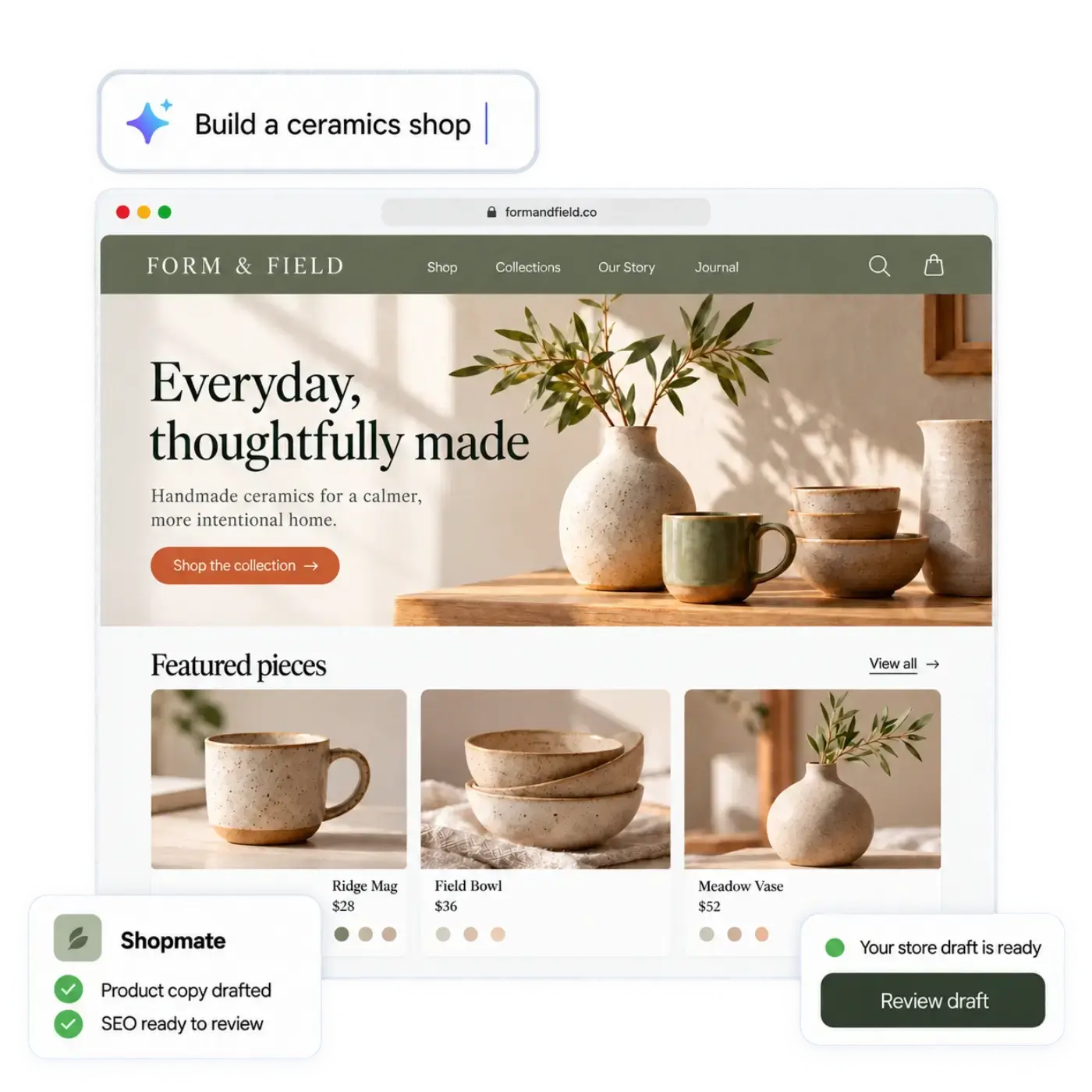
Describe your shop to the AI store builder: what you sell, who it is for and the feel you want. It drafts a design, the page copy and a first catalog, and you edit anything by clicking it or by asking Shopmate in plain words. Nothing is public until you publish. The step-by-step version is in create your first store, and meet Shopmate explains the assistant.
Read everything the builder wrote. AI can get things wrong, so check names, prices and descriptions, and remove anything that is not true for your shop.
6. How do I add my products?
Add each product with photos, a price, a description, and options such as size or colour. Group products into collections so customers can browse. If you have many products, import them from a spreadsheet: see import products from a CSV.
Three things make product pages sell:
- Good photos. A phone and daylight are enough to start. See product photos with a phone.
- Clear descriptions. Say what the product is, what it is made of and who it is for. Use AI to write product descriptions shows how to draft them and then fix them.
- Honest options. Sizes and colours belong as options of one product. See sell products with variants.
7. How do I get paid?
Connect your own Stripe or PayPal account. Payments go to your account, at your provider’s rates. Set your region and currency, and add tax regions for the places you sell to. If you are unsure how tax applies to you, ask an accountant. The full steps are in set up payments, and selling in more than one currency covers selling abroad.
8. How do I set up shipping?
Create a stock location, a shipping profile and one or more shipping options. Start small, for example one option for your home country and one for everywhere else, and refine it later. Digital products can skip shipping. See set up shipping rates.
9. Which policies do I need?
Write clear pages for shipping and delivery, returns and refunds, privacy, and your terms of sale. Customers read the returns policy before they buy, and the law in many places requires you to display certain seller information and consumer rights. Check what applies where you sell, and ask a professional if you are unsure. This guide is not legal advice.
10. How do I test before I launch?
Place a real test order from start to finish: add to cart, enter an address, pay, and check the confirmation and the order in your admin. Then practise a return or exchange. Manage orders, returns and exchanges shows what to expect after the first sale. Use a phone as well as a computer, because many of your customers will use one.
11. How do I launch?
Publish when the test order works and you have read every page. If you want to move fast, launch your store in a day gives an hour-by-hour checklist. After you publish, share the store with people who already know you. A first handful of orders teaches you more than any amount of planning.
12. How do I get my first customers?
Start with the things that cost the least:
- Get found in search. Write clear titles and descriptions, and make sure each product has its own page. The ecommerce SEO checklist lists the basics, and getting found in Google and AI assistants covers the newer places people look.
- Send your products to shopping surfaces. See send your products to Google and Meta.
- Sell on pages you already have. A buy button lets someone buy from a blog or a link-in-bio page.
- Run a simple offer. Create discounts and promotions shows how.
Pick one or two and do them well, rather than doing everything half-way.
13. How do I keep up with the routine work?
Once the store is running, the daily tasks repeat: new listings, search copy, page changes, orders and stock. AI agents can take on some of that routine work. You decide what each agent may do on its own and what waits for your approval. What an AI workforce can do for a small shop is honest about both the help and the limits.
Which mistakes should I avoid?
- Launching with no policies or no test order. Both take an hour and save a lot of trouble.
- Trusting generated text without reading it. Read every page before you publish.
- Copying product descriptions from a supplier. They are the same on every other store, and they do not help you stand out.
- Hiding the full cost. Show shipping and tax clearly, so customers do not abandon the checkout at the last step.
- Doing too much at once. Start with a small range and one or two ways to find customers.
What should I do next?
If you are ready to start, describe your shop in a sentence. morebasket is in beta, and we are letting people in from a waiting list: join the waiting list and we will tell you when it is your turn. If you want a place to start today, work through step 1 and write your one-line description of what you sell and who it is for.